 Mailbox select list
Pressing the arrow on the right drops down a list of
your mailboxes. The contents of the mailbox that is
selected are displayed in the window below. You can
add or remove mailboxes from the list using the
buttons on the right.
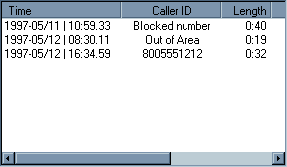
This window displays the messages in the selected mailbox.
Messages are listed in cronological order with the oldest
at the top. The Date and time of the call are displayed
in the form YYYY-MM/DD | HH:MM.SS in 24 hour time. If you
double click on the time that message will be played.


